
Background processing
Background processing allows tasks to run silently in the background rather than freezing your screen while they process. This lets you continue working without interruption.
You can check the status and history of these background tasks on the Background Processing screen.
Required
Permissions: Group manager (Edit) + Content manager (Edit) + Grade manager (Edit)
Background processing applies to the following tasks:
- Duplicating courses, folders, or content (when exceeding a certain quantity)
- Generator updates
- Bulk score correction
- AI grading
- Bulk user registration (when exceeding a certain number of accounts)
- Deleting user-related data (when deleting accounts with associated grades or records)
- Bulk content assignment settings (when exceeding a certain number of items)
- Importing Diagnostic Test Answers
Instructions
01. Go to Background processing
Click Background processing in the side menu.
02. View task history
The following page will be displayed.
You can view the history of background processing in the list.
You can also filter the displayed results using the search field at the top of the screen.
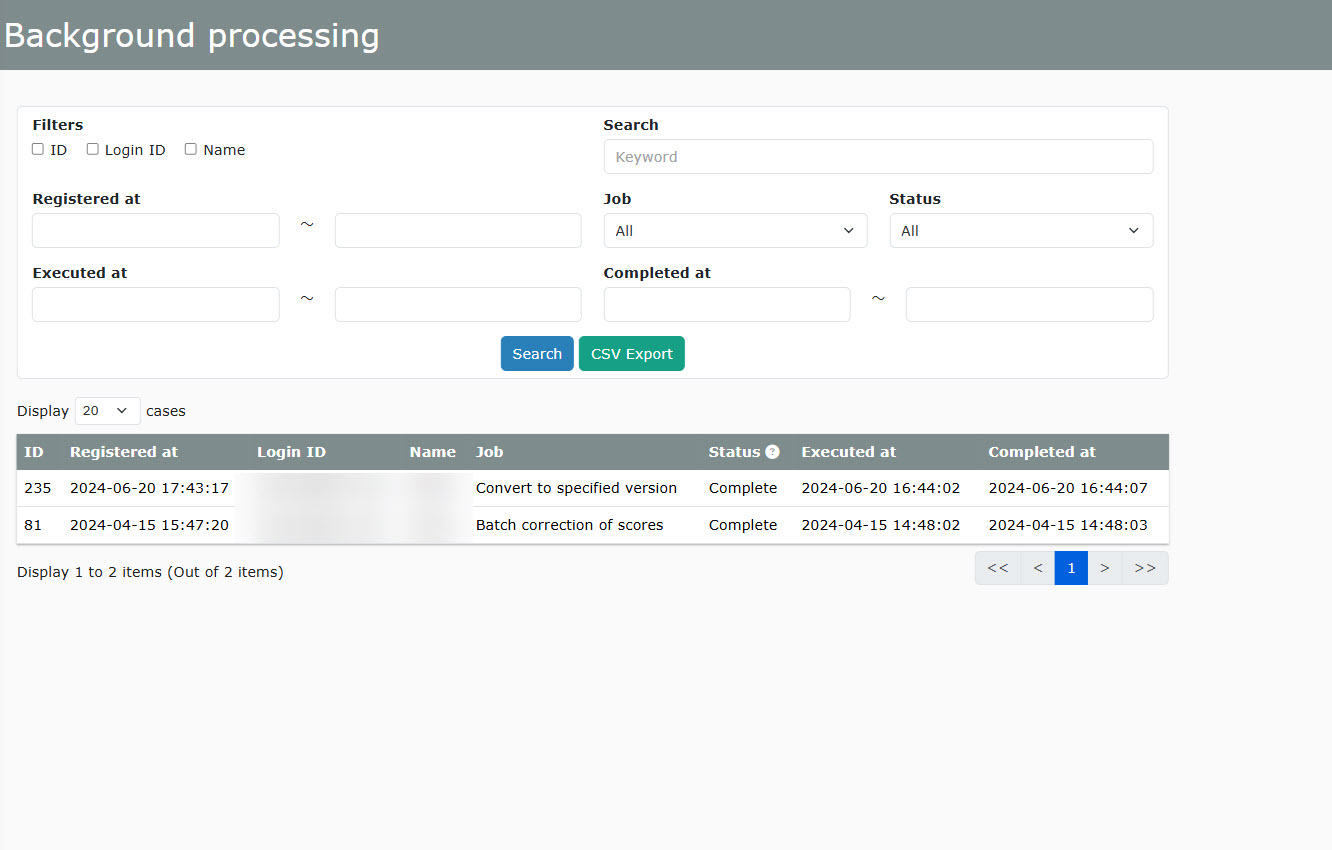
The search target and keyword options are only available on the Admin page.
Regular users will only see tasks that they executed themselves.
03. CSV Export
Click CSV Export to download the displayed list.