
Calculating Fees When Making Changes to a Contract
Here is an explanation of how fees are calculated when you upgrade your license or add accounts or options.
When upgrading a license or adding an account
01. Add an Account
When upgrading from the [Starter 100 / Annual Contract] to the [Starter 200 / Annual Contract] (adding accounts mid-term): Cases where the end date is extended
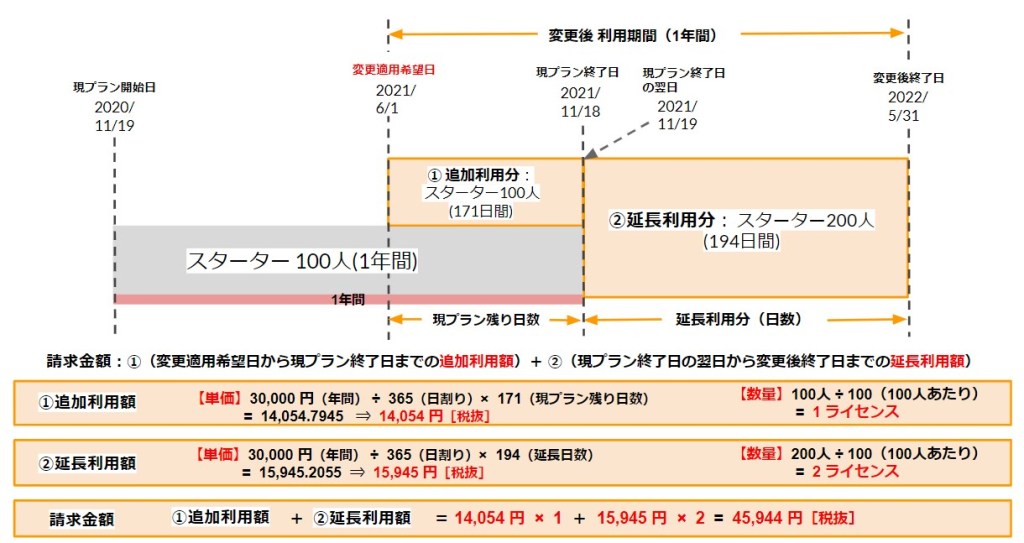
02. Adding a License
If you switch from the [Starter 100 / Annual Plan] to the [Standard 100 / Annual Plan] during the contract period: Cases where the end date is not extended
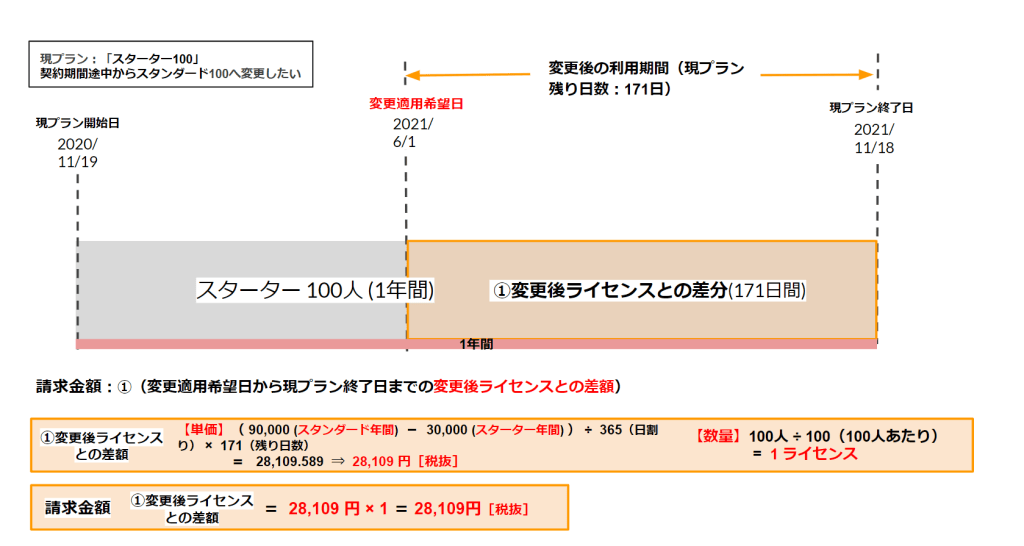
If you switch from the [Starter 100/Month Plan] to the [Standard 100/Month Plan] during the contract period: Cases where the end date is extended

If you switch from the [Starter 100 / Monthly Plan] to the [Standard 100 / Annual Plan] during the contract period

When Adding Options
01. Customization
If you add customizations during the term of your contract, the upgrade requires an annual contract. As a result, your license term will be extended accordingly, and you will be billed for the license fees for the new term.
To customize your order, you will need to submit the necessary documents, such as a design request form, and coordinate with our representative after placing your order.
Regarding the Process and Required DocumentsAbout Using Customization.
02. QuizGenerator License
Adding an option mid-contract for owners with only a standard license: Cases where the expiration date is not extended

When adding a spot
01. When ordering an additional spot
Original Plan: [Starter 100] ⇒ If you want to upgrade to [Starter 200] for just one month within the contract period (adding 100 accounts)
Amount Charged: [Starter 100 (1 month)] = 5,500 yen (tax included)
*You will be billed for one month's worth of Spot Contract usage.

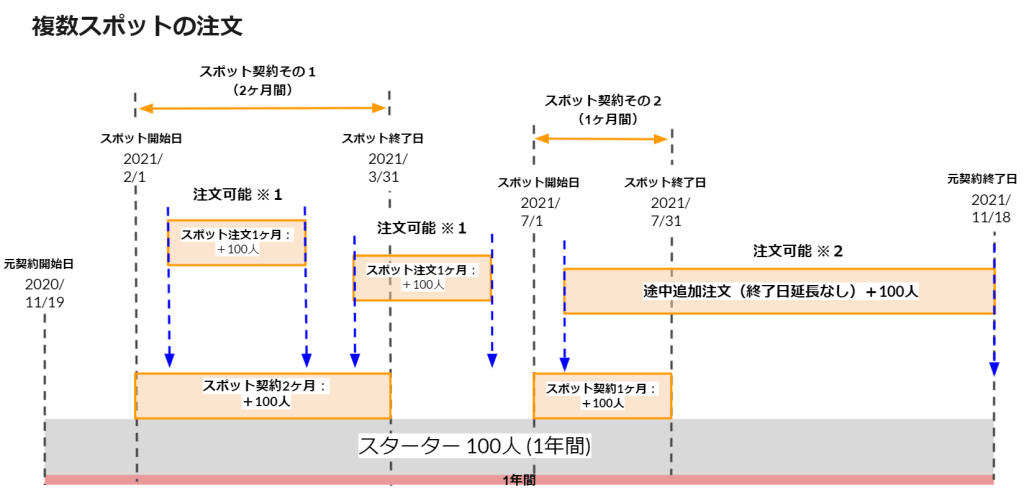
02. When Ordering Multiple Spots
It is also possible to place new spot orders that overlap with the term of an existing spot contract.
*You can place an order for an additional license under the main contract even if it overlaps with the term of an existing spot contract.
Important Notes Regarding the Pricing Structure
If you have an option plan, depending on the status of your option contract, the “period during which changes take effect” may be limited, and you may not be able to apply the annual rate.
Please see the table below for more details.
▼Example: When adding only additional users during the contract period
| Current Contract | Selecting the Period for Which to Apply Changes | Control Items | Charges (On a per-unit basis) |
| Annual Contract | Do not change the contract end date | Apply the monthly rate *If you have an optional service, you can only select "Do not change the contract period." | Go up |
|---|---|---|---|
| Renew the contract term for the new fiscal year (Select a year) | Apply the annual unit price | Unchanged | |
| Monthly Subscription | Do not change the contract end date | Apply the monthly rate *If you have an optional service, you can only select "Do not change the contract period." | Unchanged |
| Change the Contract End Date (Select 1 month to 11 months) | For terms of 1 to 11 months, the monthly rate applies | Unchanged | |
| Renew the contract term for the new fiscal year (Select a year) | Apply the annual unit price | Go down |